Introduction
Building intelligent conversational experiences on WhatsApp requires careful architectural decisions and proper tool integration. This guide demonstrates how to build a production-ready Twilio WhatsApp AI assistant that processes voice messages, manages calendar events, performs web searches, and maintains conversation context across multiple sessions.
The implementation uses Python, FastAPI, LangGraph, and OpenAI's GPT-4 models. This is not a theoretical exploration. The architecture described here is based on a working implementation available at github.com/GonzaGomezDev/whatsapp-ai-assistant-starting-setup, and every technical decision discussed reflects real implementation trade-offs.
What You'll Build
The system architecture includes these capabilities:
- Text and voice message processing through WhatsApp
- Automatic audio transcription using OpenAI Whisper
- Google Calendar integration (create, view, delete events)
- Real-time web search via Tavily API
- Persistent conversation history using PostgreSQL
- Multi-tool routing through LangGraph's state machine
This is an agentic AI system. The distinction matters because traditional chatbots follow predefined conversation flows, while agentic systems reason about which tools to use based on user intent. The architectural implications of this choice affect everything from database design to error handling strategies.
Why Twilio WhatsApp for AI Assistants
Twilio's WhatsApp Business API provides specific technical advantages for AI-powered conversational systems:
Scale and Reach: WhatsApp's 2+ billion user base means your implementation can reach users globally without requiring them to install additional applications or learn new interfaces.
Rich Media Processing: Unlike SMS-based systems, WhatsApp supports voice messages, images, and documents. This matters for AI assistants because it allows audio transcription, image analysis, and document processing within a single communication channel.
Business System Integration: The Twilio API provides webhook-based message handling, which integrates cleanly with modern web frameworks. You can connect to CRMs, databases, and automation tools using standard HTTP interfaces.
Programmable Control: Full API access means you control message routing, content transformation, and integration logic. You're not constrained by platform limitations common in no-code chatbot builders.
Architecture Overview
The system uses these core components:
- FastAPI: Async Python web framework for handling Twilio webhooks with low latency
- LangGraph: State machine framework for agentic workflows with PostgreSQL-backed persistence
- OpenAI GPT-4o-mini: Language model for natural language understanding and tool selection
- PostgreSQL: Two separate databases (one for conversation checkpointing via LangGraph, one for message history)
- Twilio WhatsApp API: Message delivery platform with webhook-based event handling
- OpenAI Whisper: Speech-to-text model for voice message transcription
- Google Calendar API: Calendar management with OAuth 2.0 authentication
- Tavily Search: Web search API for real-time information retrieval
The system follows a stateful conversational pattern. Each user (identified by phone number) maintains an independent conversation thread with its own state checkpoint in PostgreSQL. This architectural choice has specific implications for concurrency, data isolation, and memory management.
Prerequisites
Before diving into the implementation, ensure you have:
- Python 3.10 or higher installed on your system
- PostgreSQL database (local or cloud-hosted)
- Twilio account with WhatsApp sandbox or approved business number
- OpenAI API key with access to GPT-4 models and Whisper
- Google Cloud project with Calendar API enabled
- Tavily API key for web search functionality
- Basic familiarity with Python, REST APIs, and database concepts
Step 1: Setting Up Your Development Environment
Clone the Repository
git clone https://github.com/GonzaGomezDev/whatsapp-ai-assistant-starting-setup.git
cd whatsapp-ai-assistant-starting-setup/backend
Install Python Dependencies
pip install -r requirements.txt
Key dependencies from requirements.txt:
fastapianduvicornfor the web serverlangchain,langgraph, andlangchain-openaifor AI orchestrationlanggraph-checkpoint-postgresfor conversation persistenceopenaifor GPT-4 and Whisper integrationtwiliofor WhatsApp APIpsycopg2-binaryfor PostgreSQL connectivitygoogle-api-python-clientfor Calendar integrationlangchain_tavilyfor web searchsqlalchemyfor message history ORM
Configure Environment Variables
Create a .env.development file in the backend directory:
# OpenAI Configuration
OPENAI_API_KEY=sk-proj-xxxxxxxxxxxxx

# Twilio WhatsApp Configuration
TWILIO_ACCOUNT_SID=ACxxxxxxxxxxxxx
TWILIO_AUTH_TOKEN=xxxxxxxxxxxxx

# PostgreSQL Database
DB_USER=postgres
DB_PASSWORD=your_secure_password
DB_HOST=localhost
DB_PORT=5432
DB_NAME=langgraph
DB_DRIVER=postgresql+psycopg2

# Tavily Search API
TAVILY_API_KEY=tvly-xxxxxxxxxxxxx

# Google Calendar OAuth
GOOGLE_CALENDAR_SCOPES=https://www.googleapis.com/auth/calendar.events
GOOGLE_CALENDAR_CREDENTIALS_FILE=./credentials.json
GOOGLE_CALENDAR_TOKEN_FILE=./token.json
GOOGLE_CALENDAR_DEFAULT_CALENDAR_ID=primary
Step 2: Database Setup for Conversation Persistence
The Twilio WhatsApp AI assistant uses two separate database mechanisms:
- LangGraph checkpointing for conversation state (managed automatically)
Custom message table for message history logging
Create the PostgreSQL Database
psql -U postgres
CREATE DATABASE langgraph; \q
Understanding the Database Schema
The implementation in models.py defines a Message table:
class Message(Base):
    __tablename__ = "messages"

    id = Column(Integer, primary_key=True, index=True)
    _from = Column(String(50), nullable=False)
    _to = Column(String(50), nullable=False)
    content = Column(Text, nullable=False)
    created_at = Column(String(50), nullable=False)
    message_type = Column(String(20), nullable=False)  # "user" or "ai"
This table stores a complete message history separate from LangGraph's checkpointing system. This design choice provides:
- Audit trail for all conversations
- Ability to query message history independently of conversation state
- Backup mechanism if LangGraph checkpoints are pruned
- Analytics and reporting capabilities
The table is created automatically when the application starts via SQLAlchemy's Base.metadata.create_all().
LangGraph Checkpointing
LangGraph's PostgresSaver creates its own tables for conversation state:
- checkpoints: Store complete conversation state snapshots
- checkpoint_writes: Track individual state mutations
- checkpoint_metadata: Store thread identifiers and configuration
The implementation in assistant.py handles PostgresSaver initialization with fallback logic:
# Try URL form first, then DSN
for candidate in (connection_string, dsn_fallback):
    try:
        cm = PostgresSaver.from_conn_string(candidate)
        self.memory = self._exit_stack.enter_context(cm)
        break
    except Exception as e:
        last_err = e
This dual connection approach handles different PostgreSQL authentication methods. The ExitStack ensures proper cleanup of the database connection context manager.
Important: The PostgresSaver.from_conn_string() returns a context manager, not a saver instance directly. Failing to enter the context will cause runtime errors. The implementation uses ExitStack to manage this lifecycle properly.
Step 3: Google Calendar Integration
The calendar integration demonstrates how natural language interfaces can control structured business logic. Users express intent in conversational form, and the system translates this into specific API calls.
Setup Google Cloud OAuth
- Navigate to the Google Cloud Console
- Create a new project or select an existing one
- Enable the Google Calendar API in the API Library
- Go to APIs & Services > Credentials
- Click Create Credentials > OAuth 2.0 Client ID
- Choose Desktop application as the application type
- Download the credentials JSON file
- Save it as
credentials.jsonin your backend directory
Understanding the Calendar Tools
The implementation in tools/calendar.py exposes three functions as LangChain tools:
1. Create Calendar Event
def create_calendar_event(
    summary: str,
    start: str,
    end: str,
    description: Optional[str] = None,
    attendees: Optional[List[str]] = None,
    location: Optional[str] = None,
    calendar_id: Optional[str] = None,
) -> dict:
This function handles event creation with automatic attendee notifications. Key implementation details:
- Validates that
enddatetime is afterstart - Converts ISO 8601 strings to timezone-aware datetime objects
- Assumes UTC if no timezone provided
- Sends email invitations via
sendUpdates="all"parameter - Returns the created event resource from Google Calendar API
2. Get Calendar Events
def get_calendar_events(
    time_min: str,
    time_max: str,
    calendar_id: Optional[str] = None
) -> List[dict]:
Retrieves events within a specified time range. The implementation:
- Uses
singleEvents=Trueto expand recurring events - Orders results by
startTimefor chronological display - Returns raw event resources from Google Calendar API
3. Delete Calendar Event
def delete_calendar_event(
    start_time: str,
    calendar_id: Optional[str] = None
) -> None:
Removes events by matching start time. Implementation approach:
- Queries events starting from specified time
- Takes the first matching event (assumes unique start times)
- Deletes via Google Calendar API
This design assumes users don't have multiple events at the exact same start time. Production systems may need additional disambiguation logic for edge cases.
OAuth Flow and Token Persistence
The _load_credentials() function in calendar.py implements OAuth with token caching:
def _load_credentials() -> Credentials:
    creds: Optional[Credentials] = None

    # Load existing token if present
    if TOKEN_FILE and os.path.exists(TOKEN_FILE):
        try:
            creds = Credentials.from_authorized_user_file(TOKEN_FILE, SCOPES)
        except Exception:
            creds = None

    # Refresh if expired
    if creds and creds.expired and creds.refresh_token:
        try:
            creds.refresh(Request())
        except Exception as e:
            creds = None

    # If no valid creds available, start browser-based flow
    if not creds:
        flow = InstalledAppFlow.from_client_secrets_file(CREDENTIALS_FILE, SCOPES)
        try:
            creds = flow.run_local_server(port=0)
        except Exception:
            creds = flow.run_console()
The implementation tries run_local_server() first for smoother UX, falling back to run_console() if the local server approach fails. The token is persisted to token.json for subsequent runs.
Step 4: Understanding the LangGraph Agent Architecture
The Twilio WhatsApp AI assistant uses LangGraph to implement an agentic workflow. This section examines the actual implementation to understand how the system handles multi-step reasoning and tool execution.
State Management
The conversation state in assistant/state.py uses a minimal TypedDict structure:
class State(TypedDict):
    messages: Annotated[list, add_messages]
This design is intentionally minimal. The state contains only the message history, with the add_messages reducer handling message accumulation. This means:
- State persistence happens at graph execution boundaries
- Each checkpoint is immutable and versioned
- State recovery after failures returns to the last successful checkpoint
- Memory usage grows linearly with conversation length
The Agent Graph Structure
The implementation in assistant.py builds a graph with two primary nodes:
self.graph_builder = StateGraph(State)
self.graph_builder.add_node("chat", self.chat)
self.graph_builder.add_node("tools", self.tool_node)
Chat Node: Processes messages and invokes the language model:
def chat(self, state: State):
    """Chat node that processes messages and generates responses."""
    return {
        "messages": [self.agent.invoke(state["messages"])]
    }
The chat node is simple. It takes the current message history, passes it to the bound language model, and returns the model's response.
Tools Node: Executes requested tools via BasicToolNode:
class BasicToolNode:
    def __call__(self, inputs: dict):
        if messages := inputs.get("messages", []):
            message = messages[-1]
        else:
            raise ValueError("No message found in input")
        outputs = []
        for tool_call in message.tool_calls:
            tool_result = self.tools_by_name[tool_call["name"]].invoke(
                tool_call["args"]
            )
            outputs.append(
                ToolMessage(
                    content=json.dumps(tool_result),
                    name=tool_call["name"],
                    tool_call_id=tool_call["id"],
                )
            )
        return {"messages": outputs}
The tools node extracts tool calls from the last AI message, executes each tool with provided arguments, and returns ToolMessage objects containing the results.
Conditional Routing Logic
The routing between nodes uses BasicToolNode.route_tools():
@staticmethod
def route_tools(state: State):
    if isinstance(state, list):
        ai_message = state[-1]
    elif messages := state.get("messages", []):
        ai_message = messages[-1]
    else:
        raise ValueError(f"No messages found in input state")
    if hasattr(ai_message, "tool_calls") and len(ai_message.tool_calls) > 0:
        return "tools"
    return END
This function checks the last message for tool calls. If present, it routes to the tools node. Otherwise, it terminates the graph execution.
The graph connections:
self.graph_builder.add_conditional_edges(
    "chat",
    BasicToolNode.route_tools,
    {"tools": "tools", END: END},
)
self.graph_builder.add_edge("tools", "chat")
self.graph_builder.add_edge(START, "chat")
This creates a loop: START → chatbot → tools (optional) → summarize → END
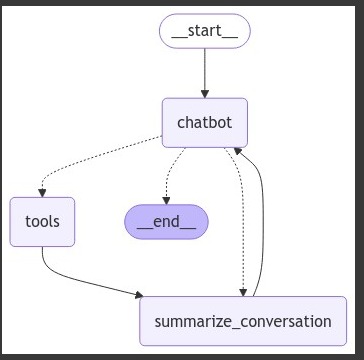
The system has no hardcoded maximum iterations. The model decides when to stop requesting tools. In practice, GPT-4o-mini rarely needs more than 2-3 tool invocations per request, but unbounded loops are theoretically possible.
Tool Binding
Tools register with the language model through LangChain's bind_tools:
self.tools = [
    TavilySearch(max_results=5),
    create_calendar_event,
    get_calendar_events,
    delete_calendar_event,
]
self.agent = init_chat_model(
    "gpt-4o-mini",
    temperature=0.5,
    use_responses_api=True
).bind_tools(self.tools)
The model learns tool usage from function signatures, docstrings, and parameter type hints. The implementation uses temperature=0.5, which introduces controlled randomness in responses while maintaining reasonable consistency in tool selection.
The use_responses_api=True parameter enables structured output parsing for tool calls, which is required for proper tool execution.
Step 5: Implementing the Twilio Webhook Handler
The FastAPI webhook implementation in main.py handles incoming WhatsApp messages and routes them through the assistant.
The Message Endpoint
@app.post("/message")
async def receive_message(request: Request):
    form_data = await request.form()
    from_number = form_data.get("From")
    to_number = form_data.get("To")

    if not from_number or not to_number:
        raise HTTPException(
            status_code=400,
            detail="Missing From or To fields in webhook payload"
        )

    body: str | None = None
    assistant = Assistant()

    # Detect audio media attachment and attempt transcription
    media_content_type = form_data.get("MediaContentType0")
    if media_content_type and media_content_type.startswith("audio/"):
        media_url = form_data.get("MediaUrl0")
        # ... audio handling code
    else:
        body = form_data.get("Body") or ""

    try:
        message = await assistant.generate_response(
            prompt=body,
            from_number=from_number,
            to_number=to_number
        )
    except Exception as e:
        print(f"[receive_message] Error generating response: {e}")
        raise HTTPException(status_code=500, detail="Failed to generate response")

    return {"status": "Message sent"}
The endpoint extracts phone numbers and message content from Twilio's webhook payload, detects voice messages, and processes them accordingly.
Voice Message Transcription
The audio handling code downloads the media file and transcribes it:
# Twilio media URLs require basic auth
account_sid = os.getenv("TWILIO_ACCOUNT_SID")
auth_token = os.getenv("TWILIO_AUTH_TOKEN")

try:
    resp = requests.get(
        media_url,
        auth=(account_sid, auth_token),
        timeout=30
    )
    resp.raise_for_status()
    audio_bytes = resp.content

    # Derive filename extension from content-type
    ext = "ogg" if media_content_type == "audio/ogg" else media_content_type.split("/")[-1][:5]
    transcript = await assistant.transcribe_audio(audio_bytes, filename=f"voice.{ext}")

    body = transcript.strip() or "(Unintelligible audio or empty transcription)"
except Exception as e:
    print(f"[receive_message] Audio transcription failed: {e}")
    body = "(Error transcribing audio message)"
The implementation uses HTTP Basic Auth to download media from Twilio's temporary storage. The audio bytes are passed to the assistant's transcription method.
The transcription implementation in assistant.py:
async def transcribe_audio(self, audio_bytes: bytes, filename: str = "audio.ogg") -> str:
    # Wrap bytes in a file-like object with a name attr
    audio_file_obj = io.BytesIO(audio_bytes)
    audio_file_obj.name = filename

    try:
        model = AsyncOpenAI(api_key=os.getenv("OPENAI_API_KEY"))

        transcription = await model.audio.transcriptions.create(
            model="whisper-1",
            file=audio_file_obj,
            response_format="text",
        )
        return transcription or ""
    except Exception as e:
        print(f"[transcribe_audio] Failed to transcribe audio: {e}")
        return ""
Whisper has a 25MB file size limit. The implementation wraps audio bytes in a BytesIO object with a name attribute because the OpenAI library requires file-like objects with filenames to infer audio format.
The response_format="text" parameter returns plain transcribed text rather than JSON metadata. This is simpler to work with for conversational applications.
Processing Messages Through the Agent
The generate_response() method in assistant.py orchestrates the complete interaction:
async def generate_response(self, prompt: str, from_number: str, to_number: str) -> str:
    # Store prompt in DB
    db = SessionLocal()
    try:
        msg_record = Message(
            _from=from_number,
            _to=to_number,
            content=prompt,
            created_at=date.today().isoformat(),
            message_type="user"
        )
        db.add(msg_record)
        db.commit()
    except Exception as e:
        print(f"Error saving incoming message to DB: {e}")
    finally:
        db.close()

    # Create messages with system instructions
    messages = [
        {
            "role": "system",
            "content": self.assistant_instructions +
                      f"\n\nCurrent date is {date.today().isoformat()} and default timezone is UTC -3 (ART)."
        }
    ]

    # Add current user message
    messages.append({"role": "user", "content": prompt})

    # Use phone number as thread ID for persistent memory
    config = {"configurable": {"thread_id": from_number}}

    final_response = ""

    for step in self.graph.stream({"messages": messages}, config, stream_mode="messages"):
        # Process streaming responses
        if isinstance(step, tuple) and len(step) == 2:
            message_chunk, metadata = step

            if (hasattr(message_chunk, 'content') and message_chunk.content):
                content = message_chunk.content

                # Handle both string and list content
                if isinstance(content, list):
                    text_content = ""
                    for item in content:
                        if isinstance(item, dict) and 'text' in item:
                            text_content += item['text']
                        elif isinstance(item, str):
                            text_content += item
                        elif hasattr(item, 'text'):
                            text_content += item.text
                    content = text_content

                # Filter out JSON responses and empty content
                if content and not str(content).startswith('{'):
                    final_response += content
The key architectural decisions:
- Thread ID: Uses
from_numberas the thread identifier, which means each user gets their own persistent conversation thread in LangGraph's checkpoint system. - System Instructions: Loads prompt from
prompts/_evo_001file and appends current date/timezone context. The system prompt is loaded once during initialization rather than on each request. - Streaming Mode: Uses
stream_mode="messages"which yields individual message chunks as they're generated. The Responses API can return content as a list of blocks, so the implementation handles both string and list content types. - Response Filtering: Filters out JSON responses (which would be tool call metadata) to avoid sending structured data back to the user.
After collecting the complete response, the implementation sends it via Twilio and stores it in the message history database.
Step 6: Configuring Twilio WhatsApp
To receive messages from WhatsApp users, configure Twilio to send webhooks to your application.
Using the WhatsApp Sandbox (Development)
- Log in to your Twilio Console
- Navigate to Messaging > Try it out > Send a WhatsApp message
- Follow the instructions to join the sandbox by sending the specified code
- Set the webhook URL for incoming messages
Setting Up ngrok for Local Development
Since Twilio needs a public URL to send webhooks, use ngrok to expose your local server:
ngrok http 8000
ngrok provides a public URL like https://abc123.ngrok.io
Configure the Webhook
In the Twilio Console:
- Go to your WhatsApp sandbox settings
- Set the "When a message comes in" webhook to:
https://your-ngrok-url.ngrok.io/message - Set the method to
HTTP POST - Save the configuration
Now when users send messages to your Twilio WhatsApp number, the messages will be forwarded to your FastAPI application.
Production Deployment
For production use:
- Deploy your FastAPI app to a cloud provider with a public domain
- Apply for a Twilio WhatsApp Business account (required for production)
- Configure your production webhook URL in Twilio
- Implement webhook signature validation to prevent spoofing
- Set up monitoring and logging
- Implement rate limiting
Step 7: Testing Your Twilio WhatsApp AI Assistant
Start the Application
cd backend
uvicorn main:app --reload --host 0.0.0.0 --port 8000
You should see:
INFO:     Uvicorn running on http://0.0.0.0:8000
INFO:     Application startup complete.
Test Different Scenarios
1. Simple Conversation
You: Hello!
Assistant: [Responds with greeting and capabilities]
2. Web Search
You: What's the latest AI news?
Assistant: [Searches via Tavily and provides current information]
3. Calendar Management
You: Schedule a meeting tomorrow at 2 PM with john@example.com
Assistant: [Creates calendar event and confirms]
4. Voice Message
You: [Sends voice message]
Assistant: [Transcribes and responds to content]
5. Context Retention
You: Schedule a meeting with Sarah tomorrow at 3 PM
Assistant: [Creates event]
You: Actually, make that 4 PM
Assistant: [Understands "that" refers to Sarah's meeting and updates]
The context retention demonstrates LangGraph's checkpointing system maintaining conversation state across turns.
Performance and Scalability Considerations
Latency Sources
The implementation has several latency contributors:
- Whisper Transcription: 2-5 seconds for typical voice messages
- LangGraph Streaming: Adds minimal overhead (50-100ms)
- Tool Execution: Variable based on tool (Calendar API: 200-500ms, Tavily: 500-1000ms)
- Database Writes: Minimal impact with connection pooling
- Twilio Message Send: 200-500ms
Total response time typically ranges from 2-8 seconds depending on whether tools are invoked.
Database Optimization
The implementation uses SQLAlchemy's connection pooling for the message history database:
engine = create_engine(
    url,
    connect_args={"options": "-c client_encoding=UTF8"},
    pool_pre_ping=True
)
The pool_pre_ping=True parameter ensures connections are validated before use, preventing errors from stale connections.
For the LangGraph checkpointing system, consider:
- Adding indexes on
thread_idfor faster checkpoint retrieval - Implementing checkpoint pruning for conversations older than N days
- Monitoring checkpoint table growth
Cost Optimization
Cost breakdown per conversation turn:
- GPT-4o-mini: ~$0.0001-0.0005 per message (depending on context length)
- Whisper: ~$0.006 per minute of audio
- Twilio WhatsApp: $0.005 per message (inbound) + $0.005 (outbound)
- Tavily Search: Variable based on plan
The implementation uses temperature=0.5, which provides consistent responses without maximizing token usage. For further cost reduction, consider:
- Implementing conversation summarization to reduce context window size
- Caching common queries
- Using shorter system prompts
- Pruning old messages from conversation history
Concurrency and Scaling
The current implementation creates a new Assistant instance for each webhook request:
assistant = Assistant()
This is safe for concurrent requests because each instance manages its own database connections via ExitStack. However, this approach has trade-offs:
- Pro: No shared state between requests
- Pro: Simple error isolation
- Con: PostgresSaver initialization overhead on each request
- Con: Repeated system prompt file reads
For higher traffic, consider:
- Using dependency injection to share a single Assistant instance
- Implementing connection pooling for PostgresSaver
- Caching the system prompt in memory
Advanced Features and Customization
Adding Custom Tools
Extend the assistant by adding new tools. Example weather tool:
def get_weather(location: str) -> dict:
    """
    Get current weather for a location.

    Args:
        location: City name or ZIP code

    Returns:
        Dictionary with weather information
    """
    # Implement weather API call
    return {
        "location": location,
        "temperature": 72,
        "condition": "Sunny"
    }
Add it to the tools list in assistant.py:
self.tools = [
    TavilySearch(max_results=5),
    create_calendar_event,
    get_calendar_events,
    delete_calendar_event,
    get_weather,  # New tool
]
The language model automatically learns to use new tools based on their docstrings and type hints. Ensure docstrings clearly explain when to use each tool and what parameters are required.
Customizing the System Prompt
The system prompt is loaded from prompts/_evo_001. Modify this file to:
- Change the assistant's personality
- Add domain-specific knowledge
- Implement business rules
- Define response formats
The implementation appends current date and timezone to the prompt:
content = self.assistant_instructions +
         f"\n\nCurrent date is {date.today().isoformat()} and default timezone is UTC -3 (ART)."
Adjust the timezone based on your target users.
Common Troubleshooting Issues
PostgresSaver Context Manager Error
Issue: AttributeError: '_GeneratorContextManager' object has no attribute 'get_next_version'
Solution: This occurs when passing the context manager directly instead of entering it. The implementation correctly uses ExitStack.enter_context():
cm = PostgresSaver.from_conn_string(candidate) self.memory = self._exit_stack.enter_context(cm)Database Connection Errors
Issue: psycopg2.OperationalError: could not connect to server
Solution: Verify PostgreSQL is running and credentials are correct. The implementation tries both URL and DSN formats:
connection_string = f"postgresql://{_db_user}:{_db_pass}@{_db_host}:{_db_port}/{_db_name}" dsn_fallback = f"host={_db_host} port={_db_port} dbname={_db_name} user={_db_user} password={_db_pass}"Google Calendar OAuth Issues
Issue: Calendar operations fail with authentication errors
Solution: Delete token.json and re-authenticate. Ensure Calendar API is enabled in Google Cloud Console. The implementation falls back to console-based OAuth if the local server flow fails.
Twilio Webhook Timeout
Issue: Twilio shows webhook timeout errors
Solution: Twilio webhooks have a 10-second timeout. The implementation streams responses but doesn't implement async processing. For long-running operations, consider:
@app.post("/message")
async def receive_message(request: Request):
    # Send immediate acknowledgment
    threading.Thread(
        target=process_message_async,
        args=(from_number, to_number, body)
    ).start()

    return {"status": "Processing"}
Voice Messages Not Transcribing
Issue: Audio transcription fails or returns empty text
Solution: Check that:
- OpenAI API key has Whisper access
- Audio format is supported (Twilio sends OGG/Opus)
- Audio file size is under 25MB
- The
filenameparameter includes the correct extension - The implementation handles transcription errors gracefully by returning empty string:
except Exception as e:
    print(f"[transcribe_audio] Failed to transcribe audio: {e}")
    return ""
Security Best Practices
- Validate Twilio Requests: Implement webhook signature verification to prevent spoofing
- Rate Limiting: Implement per-user rate limits
- Input Sanitization: The implementation passes user input directly to the LLM, which is generally safe but consider additional validation for production
- Secure Credentials: Use environment variables for all sensitive data
- Access Control: Implement authentication if handling sensitive operations
- Audit Logging: The message history table provides basic audit capability
- Data Encryption: Consider encrypting sensitive data in PostgreSQL
Real-World Use Cases
Customer Support Automation
Deploy this Twilio WhatsApp AI assistant as first-line customer support:
- Answer common questions automatically via web search
- Schedule support calls through calendar integration
- Maintain conversation context across multiple sessions
- Escalate complex issues to human agents
Personal Productivity Assistant
Transform the system into a personal assistant:
- Manage calendar and schedule meetings
- Set reminders and track tasks
- Search for information on demand
- Process voice messages while multitasking
Business Process Automation
Adapt for business workflows:
- Qualify leads through conversational questions
- Schedule demos and meetings automatically
- Answer product questions via knowledge base search
- Collect and structure information from conversations
Conclusion
This implementation demonstrates a production-capable Twilio WhatsApp AI assistant built on OpenAI GPT-4, LangGraph's agentic workflows, and Twilio's messaging infrastructure. The architecture addresses several technical requirements:
- Agentic Behavior: The system reasons about tool usage rather than following predefined flows
- State Persistence: Dual database approach maintains both conversation state and message history
- Multi-Modal Processing: Unified handling of text and voice inputs through automatic transcription
- Tool Integration: Modular design enables calendar management, web search, and extensibility
- Production Considerations: Error handling, connection management, and graceful degradation
The key architectural decisions have measurable impacts. LangGraph's checkpointing trades storage for reliability. GPT-4o-mini balances cost and capability. Webhook-based message handling introduces latency constraints that affect user experience.
Understanding these trade-offs allows you to make informed decisions when adapting this architecture to your specific requirements. The implementation provides a foundation that can be extended with additional tools, different models, or integrated into larger systems.
Next Steps
To extend this Twilio WhatsApp AI assistant:
- Add Tools: Integrate CRMs, email systems, or project management platforms
- Implement Authentication: Add user verification for sensitive operations
- Analytics: Track conversation patterns and tool usage metrics
- Testing: Implement unit tests for tools and integration tests for conversation flows
- Voice Synthesis: Generate voice responses using text-to-speech
- Vision Capabilities: Add GPT-4 Vision for image analysis
- Multi-Language: Support multiple languages with language detection
- Custom Models: Fine-tune models for domain-specific use cases
Additional Resources
Ready to automate your customer conversations?
Contact meAbout the author

Gonzalo Gomez
AI & Automation Specialist
I design AI-powered communication systems. My work focuses on voice agents, WhatsApp chatbots, AI assistants, and workflow automation built primarily on Twilio, n8n, and modern LLMs like OpenAI and Claude. Over the past 7 years, I've shipped 30+ automation projects handling 250k+ monthly interactions.
Subscribe to my newsletter
If you enjoy the content that I make, you can subscribe and receive insightful information through email. No spam is going to be sent, just updates about interesting posts or specialized content that I talk about.