Introduction
Most AI voice demos show you one call working in a browser. What they skip is the part where you need to go from one call to 500 simultaneous ones without rebuilding everything.
The system I'm walking through here handles exactly that. Single calls, bulk campaigns from a CSV, configurable per-contact context fed directly to the agent, and an architecture built on LiveKit's cloud plus Twilio's global telephony network. The ceiling, once this is configured correctly, is over 1000 concurrent calls per minute.
What the system actually does
The web interface exposes two modes. Single call mode takes a phone number, an optional contact name, a voice configuration, language selection (English or Spanish), and a free-text context block where you describe the situation the agent should know about. In the demo I ran, the context was that a customer had added a 43-inch Smart TV to their cart but didn't complete the purchase. The agent handled the rejection cleanly and ended the call.
Campaign mode takes a CSV. Columns map to phone number, name, and any additional context columns you want the agent to pull from at call time. That last part matters: the context is not static across the campaign. Each contact can carry its own data, which the agent reads before dialing. That's the difference between a blast dialer and something that can actually personalize at scale.
Voice provider options include Cartesia, Deepgram, Rime, and ElevenLabs, each with their own language variants. You can preview before committing. There's also an active calls view that surfaces what's running at any given moment.
The architecture
The request path starts at the web frontend, which fires a POST /call to the FastAPI backend. From there the backend dispatches that call as a task to LiveKit's cloud. It never tries to manage the media itself.
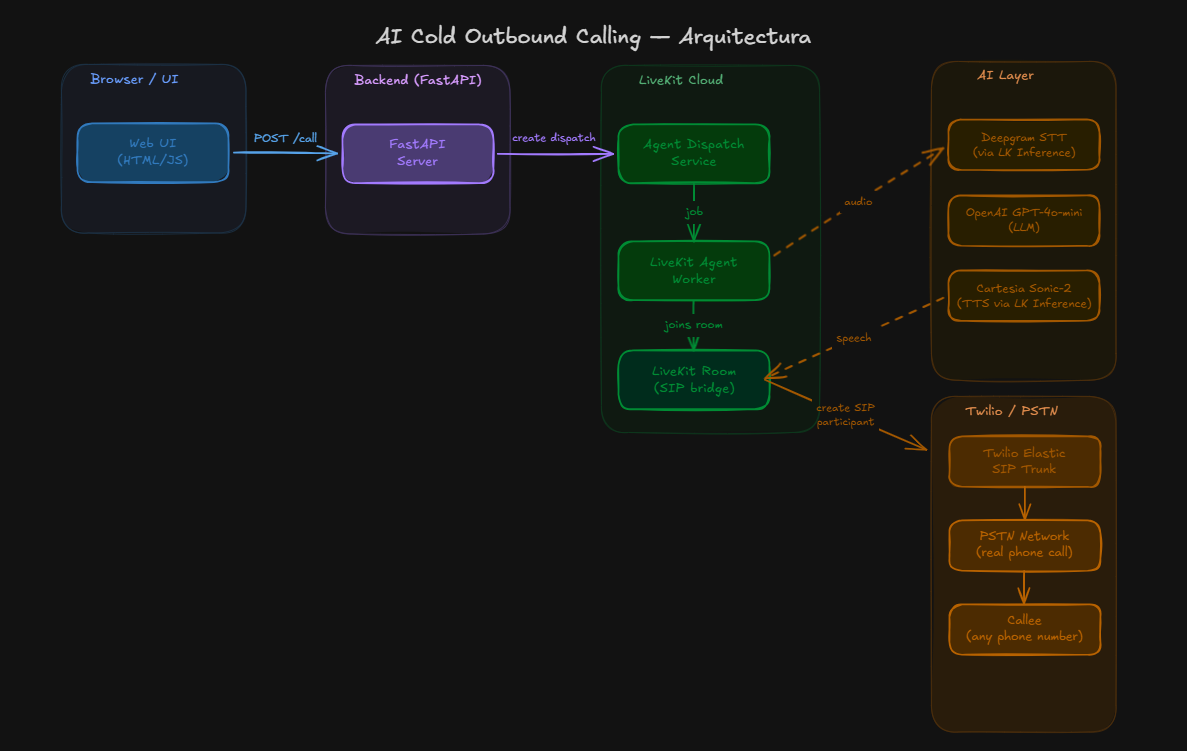
Once the LiveKit Room is created, three participants join it: the agent worker, the AI model, and eventually the called party. Speech-to-text runs through Deepgram's native inference on the LiveKit side. The LLM layer is GPT-4o Mini on OpenAI. Text-to-speech goes through Cartesia. All of this runs inside LiveKit's infrastructure, not yours.
The connection between LiveKit and Twilio goes through SIP trunks. This is the piece that makes concurrency possible.
Why SIP trunks and not a simpler integration
SIP trunks are a telephony standard for sending and receiving calls over a private or public network. In this setup you're connecting LiveKit's SIP network to Twilio's SIP network. Both platforms handle their own side of the media relay, routing, and geographic distribution. You're not provisioning servers, you're not managing latency across regions, you're not worrying about whether your backend can handle 400 simultaneous audio streams. You configure the trunk once and let both platforms handle the rest.
The configuration goes like this:
On the Twilio side, you create a SIP trunk, define a credential list for authentication (username + password), and associate your Twilio phone number with that trunk. The termination settings define where outbound calls get routed when they leave Twilio's network.
Twilio Console:
- Voice → SIP Trunks → [your trunk]
- Termination: set trunk name
- Credentials: create user/pass pair
- Numbers: associate your Twilio phone number
On the LiveKit side, you go to Telephony → SIP Trunks → create outbound trunk. The address field takes the Twilio SIP URI you captured from the Twilio trunk configuration. You add the phone numbers from your Twilio account and plug in the credentials you created on the Twilio side.
LiveKit Console:
- Telephony → SIP Trunks → New Outbound Trunk
- Address: [Twilio SIP termination URI]
- Phone numbers: [your Twilio number(s)]
- Auth: user/pass from Twilio credential list
Once both sides are configured, LiveKit and Twilio know how to talk to each other. Your backend just dispatches call tasks and the trunk handles the media path.
The code structure
There are two Python processes that need to run simultaneously.
server.py is the FastAPI backend. It exposes endpoints for single calls, campaign dispatch, active call listing, and a health check. It handles phone number normalization, CORS, and call dispatch to LiveKit. Nothing in here should need to change for most use cases.
agent.py is the LiveKit agent worker. This is where the actual AI behavior lives.
# Simplified entry point from agent.py
async def entrypoint(ctx: JobContext):
   # Base instructions fallback if none passed from UI
   instructions = ctx.job.metadata.get("instructions") or DEFAULT_INSTRUCTIONS
   language = ctx.job.metadata.get("language", "en")
   if language == "es":
       instructions += "\nSiempre responde en español."
   # Create SIP participant for outbound call
   await ctx.connect()
   participant = await ctx.room.create_sip_participant(
       sip_trunk_id=SIP_TRUNK_ID,
       phone_number=ctx.job.metadata["phone_number"],
       ...
   )
   # Initialize agent with GPT-4o Mini
   agent = VoicePipelineAgent(
       vad=silero.VAD.load(),
       stt=deepgram.STT(),
       llm=openai.LLM(model="gpt-4o-mini"),
       tts=cartesia.TTS(),
       chat_ctx=ChatContext(messages=[
           ChatMessage(role="system", content=instructions)
       ])
   )
   agent.start(ctx.room, participant)
The .env file needs six values:
OPENAI_API_KEY=...
LIVEKIT_URL=...
LIVEKIT_API_KEY=...
LIVEKIT_API_SECRET=...
SIP_TRUNK_ID=...
SIP_TRUNK_ADDRESS=…
The OpenAI key comes from platform.openai.com under API keys. The LiveKit credentials come from the LiveKit console under Settings → API Keys, which generates the URL, key, and secret together. The SIP trunk ID and address come from the LiveKit Telephony section once you've created the outbound trunk.
To run the system:
# Terminal 1: backend
python server.py
# Terminal 2: agent worker (keeps connection to LiveKit cloud open)
python agent.py dev
The agent process maintains a persistent connection to LiveKit. When a call is dispatched, LiveKit routes it to an available worker instance. That's how the same codebase scales horizontally without you changing anything.
Costs and limits
LiveKit's builder plan is currently free and covers enough volume to run tests and moderate production loads. OpenAI charges for STT and TTS transcriptions both directions, but their monthly limits at current pricing make 500 to 1000+ calls per month reasonable without significant spend.
Twilio charges per minute for outbound calls through their PSTN network. That's the main cost variable to model if you're planning high-volume campaigns.
What this is actually useful for
The architecture's use case is generic on purpose. The agent context is configurable at call time, which means you're not locked into one use case. Cart abandonment is the demo, but the same setup works for appointment reminders, lead qualification follow-ups, post-purchase surveys, or any outbound flow where you need the agent to know something specific about the person it's calling.
The campaign mode with per-row context in the CSV is the part that makes this more than a novelty. If your CRM can export a CSV with customer-specific data, your agent can read that data before dialing.
The repo link is in the video description. The README has the full setup steps. If you extend it, the most obvious direction is adding a webhook endpoint that posts call outcomes back to your CRM after each conversation ends.
-Gonza
Tags: livekit, twilio, voice-ai, outbound-calling, sip-trunks, llm-agents
Want a voice agent like this answering your calls? Take a look at my AI voice agent services.
Want something like this running in your business? Let's talk it through.
Book a free 30-minute callAlready know what you need? Start with a communication audit.