 Gonzalo Gomez
Claude Code agent team: tech lead, dev and QA subagents
How I set up an agent team in Claude Code: a tech lead that sizes the work, dev subagents with briefs on disk and a read-only QA, plus what one task cost
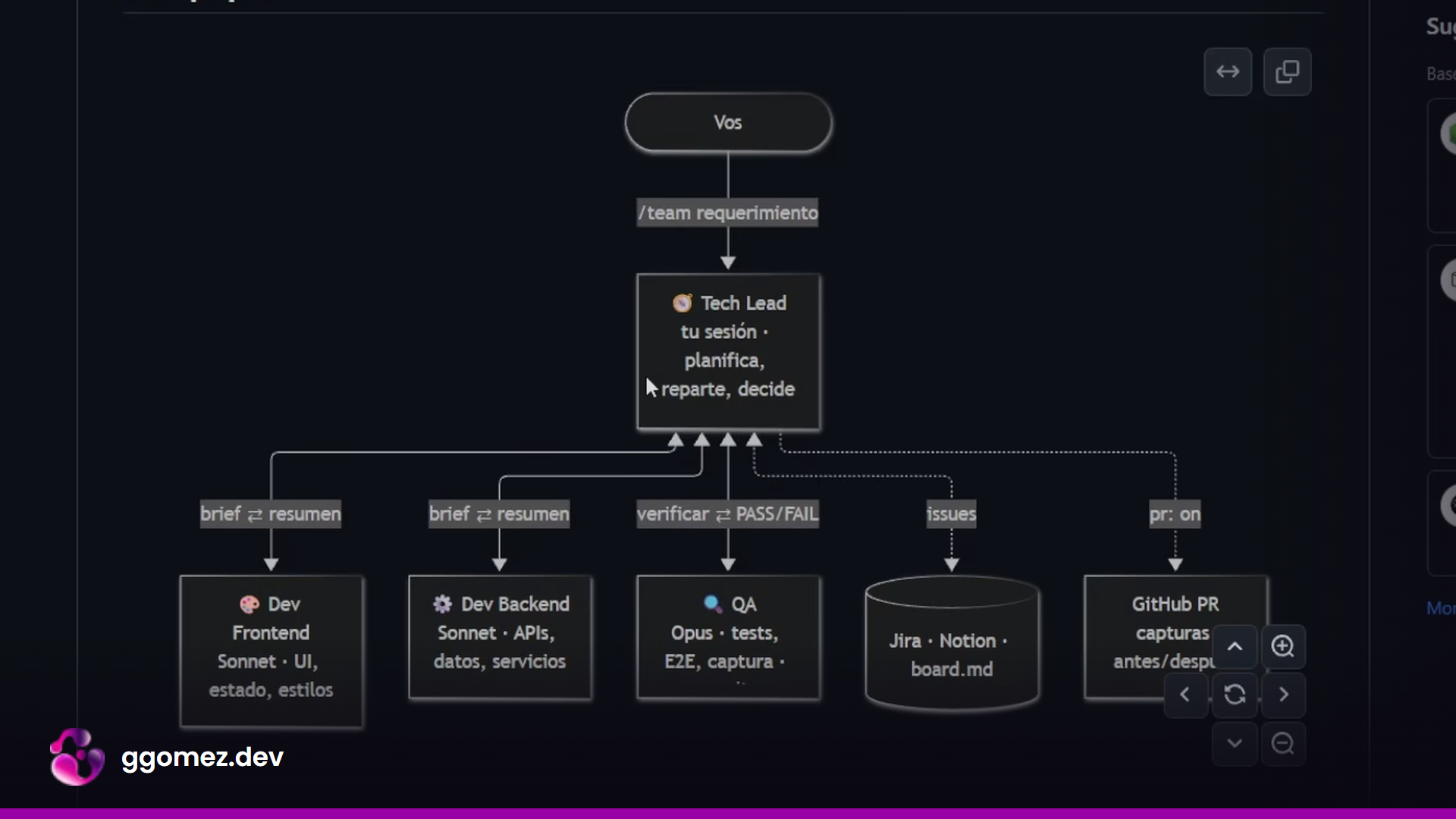
Claude Code already writes code faster than I can verify it. The slow part of my day stopped being implementation a while ago. It was me, opening a browser, clicking through the cases, finding the edge that broke, and writing back to Claude. So I built a plugin that runs every requirement through the same structure I used as a tech lead: someone who sizes and splits the work, developers who execute a closed brief, and a QA that proves it works before anything is called done.
This post is how it is wired, what it cost me on a real task, and where it breaks. The plugin is open source (MIT) and lives at GonzaGomezDev/claude-software-agents.
The problem with the default loop
The usual Claude Code loop looks like this: you describe a feature, Claude plans, you approve, Claude edits, you test it by hand, you report what failed, and you go around again. Generation is cheap. Verification is serial and it runs through one person. On a project with a UI, that person spends most of the session in a browser.
In a professional team that loop is split across roles. A tech lead turns a client requirement into small, testable tasks. Developers implement them. QA checks them against the criteria the tech lead wrote. Nobody marks their own homework. I wanted the same separation inside a single Claude Code session, without paying for four full sessions to get it.
The team
- Tech Lead: your main session. It reads the config, sizes the requirement, writes the plan and the briefs, dispatches the others and decides.
- Dev Frontend: UI, client state, styles, client-side tests.
- Dev Backend: APIs, data, services, server-side tests.
- QA: independent verification. Runs tests, lint, build and E2E, takes a screenshot of the UI, reports PASS or FAIL with evidence. It cannot edit code.
The devs and QA don't have the Agent tool, so the tech lead is the hub by design. Devs never talk to each other; the tech lead carries the API contract between them.
The most important line in the whole plugin is the QA agent's tool list:
---
name: qa
description: QA engineer of the software-team. Independently verifies task briefs
  against their acceptance criteria and reports PASS/FAIL with evidence. Read-only on code.
model: opus
effort: medium
tools: Read, Grep, Glob, Bash
---
No Edit, no Write. Bash is there to run checks and capture screenshots, and the prompt forbids touching project files outside .team/qa/. A reviewer that can patch the code ends up approving its own patches. Taking the permission away is cheaper and more reliable than asking it nicely to be strict.
Installing it
Two commands inside a Claude Code session:
/plugin marketplace add GonzaGomezDev/claude-software-agents
/plugin install software-team@software-team
The install asks for a scope: just you, every collaborator on the repo, or local to this repository. Then run setup once per project:
/team setup                      # writes .team/config.md
/team agregar filtro por fecha   # runs a requirement through the team
/team on                         # every code request goes through the Tech Lead
/team off
/team on and /team off are handled by a UserPromptSubmit hook that toggles a flag file. While the flag exists, any request that changes code is routed to the tech lead playbook without typing /team:
{
  "hooks": {
    "UserPromptSubmit": [
      {
        "hooks": [
          {
            "type": "command",
            "command": "node \"${CLAUDE_PLUGIN_ROOT}/hooks/team-mode.js\"",
            "timeout": 5
          }
        ]
      }
    ]
  }
}
The config is where your plan shows up
Setup writes .team/config.md. These are the defaults:
tracker: ask          # ask | jira | notion | chat
dev_split: auto       # auto | fullstack | front-back
dev_model: sonnet     # inherit | opus | sonnet | haiku
dev_effort: high
qa_model: opus
qa_effort: medium     # with qa_model: sonnet, use high
max_fix_rounds: 3     # QA fail -> dev fix rounds before escalating to you
ui_url:               # local URL where the UI runs, used by QA for the visual check
ui_auth:              # Playwright storage state for pages behind login
pr: off               # on = after QA PASS, commit on team/<slug>, push and open the PR
The two decisions that depend on your subscription are dev_split and the models. On my $100 plan I run two devs (front and back in parallel) and Opus for both devs and QA. On a $20 plan I would leave dev_split: auto, which only splits on large work, and accept that a single dev takes longer. Sonnet is a fair choice for the devs there, with the trade-off that it can need an extra QA round now and then. I would keep the QA on the strongest model you can afford. It is the role whose mistakes cost you the most, because a missed bug is exactly what you built the team to catch.
tracker can point at Jira or Notion through their MCPs, or stay in chat. I leave it on chat. pr I leave off because I want to decide when a PR opens; it doesn't spend extra tokens either way, so if you have a GitHub Actions deploy on merge, turning it on is a reasonable automation.
Sizing before spawning
The tech lead reads just enough of the repo to understand the change, then classifies it and says why in one line:
| Size | When | Who works |
|---|---|---|
| S | One small change, one layer | Tech lead alone, zero subagents |
| M | Real feature in one layer, or small in both | One dev plus QA |
| L | Substantial work across front and back | Both devs in parallel plus QA |
The playbook ends that section with "when in doubt, go smaller: you can escalate, you cannot refund tokens." Most of my requests land in M. Spawning three agents for a one-line fix is the fastest way to make an agent team look expensive.
Briefs on disk instead of the conversation
For M and L work the tech lead writes .team/plan.md and one brief per task:
# T<n> - <title>          owner: dev-frontend | dev-backend
Goal: <one paragraph>
Files: <paths to touch / create; nothing else>
Contract: <API shapes shared with the other dev, if any>
UI URL: <frontend only: path of the page that shows the change>
Acceptance criteria:
- [ ] <observable, testable>
Run: <exact test/lint/build commands>
The dispatch prompt is one line: implement .team/tasks/T1.md, here is the repo root. The dev never sees the conversation. Because the tech lead already found the files, the dev doesn't rescan the repository to figure out where to work, and that is where most of the savings come from. Each dev reports back in ten lines or less, so the tech lead's context doesn't grow with every task.
The QA loop and the escape hatch
QA reads the brief and the diff, runs the brief's commands plus the tests for the touched area, and checks every acceptance criterion against evidence. Frontend work is never PASS on code reading alone; it needs a screenshot. The report has a fixed shape:
T<n>: PASS | FAIL
- [x]/[ ] <criterion>: <evidence>
Failures (if any): <file:line, what is wrong, how to reproduce>
Checks: <command: result>
On FAIL, the tech lead sends QA's failures verbatim to the same dev agent with SendMessage. Re-spawning would throw away the dev's context and make it read everything again. When the dev reports back, the same QA re-verifies, re-running everything, because fixes break other things.
After max_fix_rounds (three by default) without a PASS, the team stops and hands you the open failures with a recommendation. Some failures are spec problems, not code problems, and no amount of fixing resolves a brief that asked for the wrong thing. A loop of agents with no exit is the most expensive way to not make progress.
Screenshots without burning tokens
The visual check uses the Playwright CLI with the Chrome you already have installed:
npx -y playwright screenshot --channel chrome --viewport-size "1280,800" \
  --load-storage .team/auth.json http://localhost:3000/products .team/qa/T1.png
Capturing costs zero tokens. QA reading a 1280x800 image costs about 1.4k. A browser MCP walking the same flow cost me 5 to 20k per flow, so it is now only the fallback when the CLI can't get there. For pages behind a login you save a session once:
npx playwright codegen --channel chrome --save-storage .team/auth.json http://localhost:3000
With pr: on, the tech lead captures the "before" state prior to any edit, and QA's last PASS capture is the "after". Both go into the PR body through gh pr create --attach, which needs GitHub CLI 2.99 or newer. The image QA approved is the same one that ends up in the PR, so nothing is captured twice.
A real run, and what it cost
The test was my own WhatsApp CRM, where an AI agent answers incoming chats and an operator can take over any conversation. A previous team run had added a products panel to the CRM, and that PR came back with before and after screenshots of the panel with products and empty. The next requirement was to make the chatbot actually read those products.
The tech lead scanned the repository, classified the work as backend only, and dispatched one dev plus QA. The dev found tests that were failing, fixed them, checked its diff and handed off. QA passed it on the first round: one QA round, zero fix rounds.
On cost: before the task my 5-hour usage on the $100 plan was at 4%, after it 10%. That is roughly 1 to 2% of the weekly allowance. Asking Claude for the breakdown gives you the dev's tokens and QA's tokens separately, plus the discovery the main session did on Haiku. On the $20 plan, my estimate is that the same task would have used around 30% of the 5-hour window, which is the main reason the model and split settings exist.
Why not Agent Teams
Claude Code has an experimental Agent Teams mode where each teammate is a full session that can coordinate with the others. It is the better tool when the agents genuinely need to talk to each other while they work, for example a front and a back negotiating a contract that isn't settled yet. My setup can't do that: the tech lead carries the contract, and if the contract is wrong, both devs build the wrong thing.
For the feature work I do day to day, the file sets are disjoint and the contract can be written up front, so paying for full sessions buys coordination I don't use. One practical warning if you run both: with CLAUDE_CODE_EXPERIMENTAL_AGENT_TEAMS=1, a named subagent starts as a teammate, a full session, and stops being ephemeral. The cost model above only holds with that variable off.
Where it still breaks
- If two briefs touch the same files, the tech lead has to use worktrees and merge before QA. It works, but it is more steps and more tokens.
- With
/teamin a normal session, the tech lead runs on whatever model the session uses. To pin it to Opus at high effort, start the session withclaude --agent software-team:tech-lead. - PRs with images only work on GitHub.com and Enterprise Cloud.
- QA can't approve UI it can't reach. No
ui_url, no saved login or no browser means the tech lead has to do the check or ask you for a screenshot.
The point of the team was never to write more code per day. Claude already does that. It was to stop being the only test suite in the loop, and to make "done" mean something a separate agent verified with evidence. Code generation got cheap; proving it works is where the remaining cost lives, and that is the part worth designing.
-Gonza
Want an AI agent like this working for your business? Explore my AI consulting services.