 Gonzalo Gomez
WhatsApp CRM with AI and human handoff using Claude Code
How I built an open source WhatsApp CRM with Twilio, Supabase and Claude Code where an AI agent answers and a person can safely take over any chat
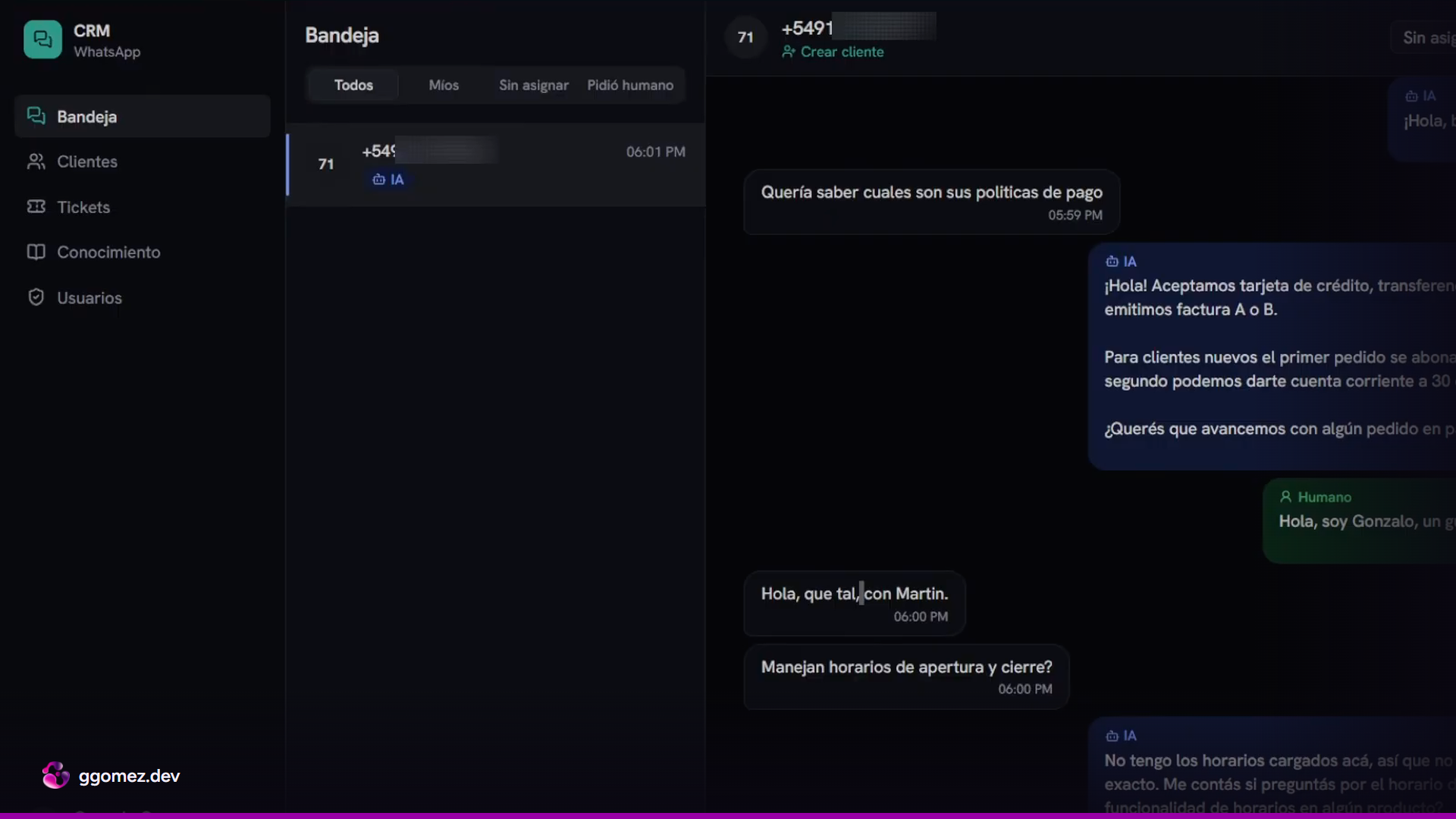
Getting an AI agent to answer on WhatsApp is the easy part. The hard part is the moment a person needs to step into the conversation, and most builds I see don't design for it at all.
I built an open source CRM on the official WhatsApp API through Twilio, with Supabase as the database and Claude as the agent. Customers write to a WhatsApp number, the agent answers on its own, and anyone on the team can take a chat from an inbox, send a couple of messages and hand it back. Claude Code installs the whole thing with one command. This post covers the decisions behind it, mostly the handoff, because that is where these systems fail in front of a customer.
What the CRM does
The panel has an inbox that groups conversations from every connected number. You can filter by conversations assigned to you, unassigned ones, and a separate tab for conversations where the agent detected that the customer wants to talk to a person. Several operators can log in, and a conversation being handled by a human is a different field from it being assigned to that human.
Each customer gets a record with name, company and email, a history of tickets (one for every time a handoff was triggered), and an AI summary that reads the conversation history and gets updated as new messages arrive.
There is also a knowledge base where you upload documents: opening hours, location, company policies, product or service information. The documents are vectorized and the agent retrieves only what the question needs. If someone asks for opening hours, the price list doesn't get loaded into context.
The backend exposes endpoints that the operator panel uses with Supabase realtime, so the inbox updates live without reloading the page.
The message flow
@router.post("/webhook/whatsapp")
async def whatsapp_webhook(request: Request, background: BackgroundTasks) -> Response:
    app_state = request.app.state
    form = dict(await request.form())

    if app_state.settings.twilio_validate_signature:
        signature = request.headers.get("X-Twilio-Signature", "")
        if not app_state.whatsapp.validate_signature(
            app_state.settings.webhook_url, form, signature
        ):
            log.warning("invalid_signature", url=app_state.settings.webhook_url)
            return Response(status_code=403, content="invalid signature")

    phone = strip_whatsapp(str(form.get("From", "")))
    body = str(form.get("Body", "") or "")
    sid = str(form.get("MessageSid", "") or "") or None
    num_media = int(form.get("NumMedia", 0) or 0)

    if not phone:
        return Response(content=EMPTY_TWIML, media_type="application/xml")

    log.info("inbound", phone=phone, body=body, sid=sid)

    # Twilio reintenta ante cualquier no-2xx. 200 primero, trabajo después.
    background.add_task(_process, request.app, phone, body, sid, num_media)
    return Response(content=EMPTY_TWIML, media_type="application/xml")
When a customer writes, Twilio sends the payload to the webhook and the server returns 200 immediately. The processing happens after the acknowledgment. Twilio only needs to know the request arrived; making it wait for an LLM call is how you end up with timeouts and retries.
Then comes the first read. Every conversation has a status with three possible values: bot, needs human, or human. If the status is human, the message is stored and nothing else happens. The agent never sees it. Every incoming message is stored in the messages table regardless of the status.
If the status is bot, the server builds the agent context:
- The last 10 messages of the conversation.
- Notes the operator left if they took the chat and gave it back.
- Four skills: customer management, tickets, knowledge base and human handoff.
The handoff skill is what lets the agent mark a conversation as needing a person. When that happens, the agent stops answering and the conversation shows up in the "needs human" tab for someone to pick it up.
The second read
if await _still_bot(db, phone, result.reply_text):
    await _reply(state, phone, result.reply_text, client_id=client_id)


async def _still_bot(db: Any, phone: str, text: str) -> bool:
    """Segunda lectura del estado, justo antes de mandar.

    La primera fue antes de llamar a Claude, y el agente tarda segundos. Si en
    ese medio el operador tomó el chat, la respuesta del bot no sale: queda en
    los logs por si el operador la quiere ver.

    ponytail: entre esta lectura y el envío quedan milisegundos de ventana (antes
    eran segundos). Cerrarla del todo pide un lock por conversación en la base.
    """
    try:
        conversation = await db.get_conversation(phone)
    except Exception as exc:  # noqa: BLE001
        log.warning("conversation_recheck_failed", error=str(exc))
        return True
    if (conversation or {}).get("status") == "human":
        log.info("reply_dropped", phone=phone, reason="chat_tomado", text=text[:200])
        return False
    return True
Before sending the reply through Twilio, the server reads the status again. This is the line that matters most in the whole build.
Building context and generating a response takes a few seconds. In that window, an operator can open the conversation, click "take chat" and type their own message. Without a second read, the agent finishes its work and sends its answer anyway, and the customer gets two different voices replying at once. With the second read, if the status changed to human while the agent was working, the reply is discarded.
This is a state problem. A common suggestion is to tell the model in the system prompt to stay quiet when a person joins. That puts the decision inside a component that can't see what the operator is doing in real time. In this design the status lives in the database, a button in the panel changes it, and the agent only reads it.
Taking the chat and giving it back
Taking a chat is meant for short interventions: confirming a discount, answering something sensitive, sending one or two specific messages. While the status is human, you can write from the panel or from WhatsApp itself and the agent stays out of the conversation.
When the operator gives the chat back to the AI, they can leave notes. Those notes go into the agent context alongside the last 10 messages, so the agent picks up the conversation knowing what the person said and why. In the demo I take the chat, send a message, hand it back with a note saying it was a test, and the next customer message is answered by the agent again.
Setup with Claude Code
The repository is public. You can clone it yourself or ask Claude Code to clone it into a folder with the name you want. From there, a setup command runs the installation end to end:
- Checks dependencies and builds the project.
- Connects to Supabase through the Supabase MCP. You authenticate in the browser and choose the organization, and Claude Code creates a new project in the region you pick (I used São Paulo, the closest one to Buenos Aires) and runs the initial SQL script.
- Loads the Twilio credentials and the WhatsApp sender number.
- Creates the first admin user for the panel with a generated password.
- Detects the ngrok domain and checks that the skills and the agent are running.
Two moments in that process are worth knowing about in advance. The initial SQL script contains statements like drop and truncate, so Claude Code asks for permission before running a potentially destructive command. On a new project it only makes sure that tables with those names don't exist, and you end up with seven tables. The second one: the Supabase MCP won't return the project's secret key, for security reasons. You copy it from the Supabase dashboard and paste it into the .env file yourself, together with the Twilio account SID, the auth token and the WhatsApp number.
The phone number side (connecting a Twilio number to Meta Business as a WhatsApp sender and funding the Twilio balance) is a separate process that I covered on its own.
Trade-offs
The local tunnel. For local development I use ngrok with a reserved domain. Twilio needs a public URL to forward messages to, and with a fixed domain you don't update the webhook in the console every time the tunnel restarts. This is a development setup: if your machine goes to sleep, your customers stop getting answers.
Running Claude locally. In local mode the agent runs Claude from the command line instead of going through the API, so testing doesn't add API costs. That choice is for building and testing. A system answering real customers goes through the API, and that cost per conversation belongs in your pricing.
Twilio's fee. Twilio adds USD 0.005 for each message sent, on top of what Meta charges. Going directly to Meta's Cloud API avoids that fee and gives you more setup work in exchange. Which side is worth it depends on your volume and on how much of Twilio's tooling you use.
A 10-message window. The agent sees the last 10 messages plus the operator notes. For most customer service conversations that is enough, and it keeps token usage predictable. In a long conversation, anything said before that window is gone for the agent, so the customer summary is where older history has to live.
Knowledge that goes stale. The knowledge base answers with what the documents say. If opening hours or prices change and nobody updates the document, the agent repeats the old information with full confidence. Someone on the team has to own those documents.
Where to extend it
The customer record is the natural place to connect other systems: pushing customers to HubSpot or another CRM, or sending conversations to a store for analytics. Since Claude Code set up the project, it is also the tool I use to add features to it.
The agent is the part people demo. What decides whether you can trust it with your customers is a status field and a second read before every reply.
-Gonza
Want an AI agent like this on your WhatsApp? Take a look at my WhatsApp AI agent services.